
के तपाई मोबाइल फोनका लागि Samsung USB ड्राइभरहरू डाउनलोड र स्थापना गर्न चाहनुहुन्छ?
Samsung USB ड्राइभरहरूको उद्देश्य के हो?
सरल शब्दहरूमा, हामीलाई हाम्रो मोबाइल फोनलाई पीसीमा जडान गर्न USB ड्राइभरहरू चाहिन्छ।
Samsung एन्ड्रोइड फोनलाई कम्प्युटरमा जडान गर्न, जुन (PC) Windows अपरेटिङ सिस्टममा चलिरहेको छ, कम्प्युटरमा सही Samsung USB ड्राइभरहरू स्थापना भएको हुनुपर्छ।
सबै Samsung USB ड्राइभरहरू माइक्रोसफ्ट विन्डोजसँग उपयुक्त छन्। त्यसैले, ड्राइभरहरूले तपाईंलाई आफ्नो एन्ड्रोइड उपकरणलाई म्याक कम्प्युटरमा जडान गर्न अनुमति दिँदैनन्।
सामसुङले प्रायः आफ्ना ग्याजेटहरू अपडेट गर्छ। र यसैले, ग्याजेटहरूलाई पनि नवीनतम ड्राइभरहरू चाहिन्छ।
राम्रो कुरा यो हो कि, सबै USB ड्राइभरहरू, विशेष गरी Samsung Galaxy श्रृंखलाका लागि डिजाइन गरिएका, नि:शुल्क उपलब्ध छन्।
र यी ड्राइभरहरूले सबै विन्डोज संस्करणहरूलाई समर्थन गर्दछ।
के तपाईको डेस्कटप वा ल्यापटप पीसी Windows XP, Vista, 7, वा Windows 10 मा चलिरहेको छ?
वा, यो 32-bit वा 64-bit को हो?
जेसुकै होस!
प्रत्येक कम्प्युटरमा, तपाईंले मोबाइल फोनहरूको लागि Samsung USB ड्राइभरहरू डाउनलोड र स्थापना गर्न सक्नुहुन्छ।
मैले तल Latest Samsung Usb Driver को Download Link दिएको छु download गर्नुहोस :
Download Samsung USB Driver

- Download Samsung USB driver on Windows.
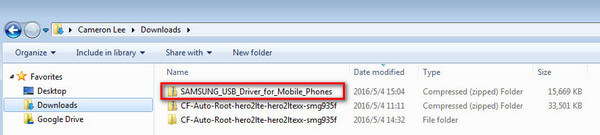
- Locate the file and extract it on your computer.
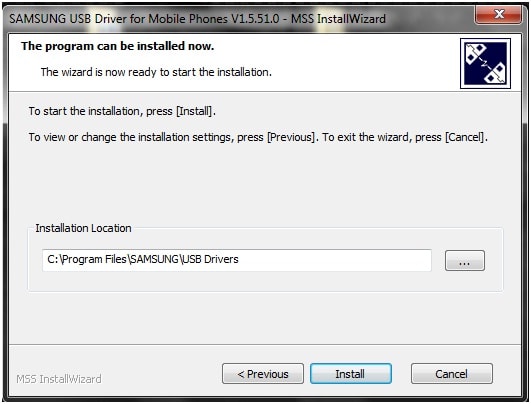
- Find the application and click to install it.
- Click "Run" when a security warning window pop up and continue the operation as instructed.
- Driver Installed successfully.
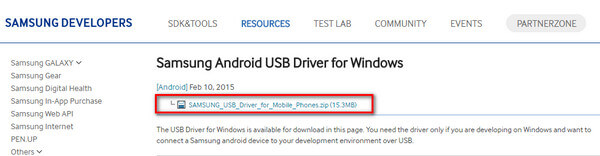
The file downloaded should be a zip file. You need to extract it.
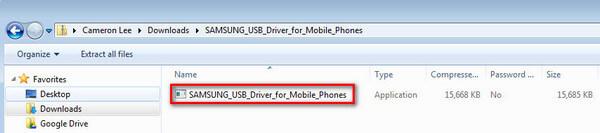
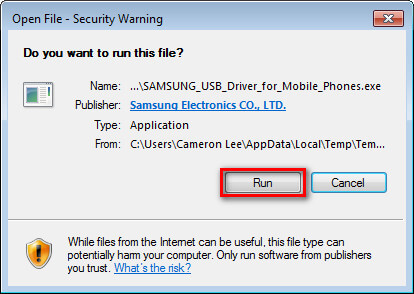
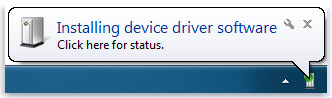
Windows will notify you when it finishes successfully installing a device.
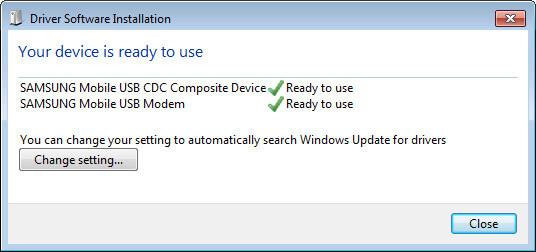
After installation is complete, check the information that came with your device to see if you need to install any additional software.
Troubleshoot
If something went wrong and your device still cannot be recognized by Windows. You should:
- Uninstall any previously installed USB Drivers for Samsung phones.
- Restart your computer.
- Re-install the driver.
- Restart your computer after the installation.



0 Comments